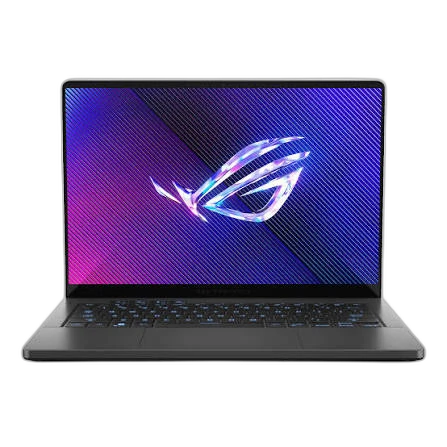

Choose ROG Zephyrus G14 if you need:
- Processor Model at AMD Ryzen 9 270 (vs Ryzen 5)
- Installed Memory at 32 GB (vs 16 GB)
- Storage Capacity at 1024 GB (vs 512 GB)
laptopedia
Side-by-side specification comparison of two reference models
A full side-by-side comparison of reference models ROG Zephyrus G14 and Pavilion 15 within the same category.
Side-by-side specification comparison of two reference models
| Specification | ROG Zephyrus G14 | Pavilion 15 |
|---|---|---|
| Price | Not for sale | Not for sale |
| General | ||
| Brand | ASUS | HP |
| Product Family | ROG | Pavilion |
| Model | ROG Zephyrus G14 | Pavilion 15 |
| Model Number | GA403UP-QS005W | — |
| Part Number / SKU | 90NR0LV1-M001P0 | — |
| Launch Year | 2025 year | 2025 year |
| Form Factor | Clamshell | Clamshell |
| Laptop Category | Gaming | Budget |
| Color | Eclipse Grey | — |
| Operating System | Windows 11 Home | — |
| Operating System Architecture | 64-bit | 64-bit |
| Processor | ||
| Processor Manufacturer | AMD | AMD |
| Processor Family | AMD Ryzen 9 | AMD Ryzen 5 |
| Processor Model | AMD Ryzen 9 270 | Ryzen 5 |
| Processor Generation | AMD Ryzen 200 Series | — |
| CPU Architecture | x86-64 | x86-64 |
| CPU Process Node | 4 nm | — |
| CPU Cores | 8 cores | — |
| CPU Threads | 16 threads | — |
| CPU Base Clock | 4 GHz | — |
| CPU Max Boost Clock | 5.2 GHz | — |
| L2 Cache | 8 MB | — |
| L3 Cache | 16 MB | — |
| Processor Base Power | 45 W | — |
| Maximum Processor Power | 54 W | — |
| AI / NPU | ||
| NPU | Yes | — |
| NPU Model | AMD XDNA | — |
| NPU Performance | 16 TOPS | — |
| Platform AI Performance | 39 TOPS | — |
| Graphics | ||
| Graphics Type | Discrete | Integrated |
| GPU Manufacturer | NVIDIA | AMD |
| GPU Model | RTX 5070 | — |
| GPU Architecture | Blackwell | — |
| VRAM Capacity | 8 GB | 0 GB |
| VRAM Type | GDDR7 | Shared system memory |
| GPU TGP | 90 W | — |
| GPU Boost Clock | 1595 MHz | — |
| MUX Switch | Yes | — |
| Advanced Optimus | Yes | — |
| Maximum External Displays | 4 displays | — |
| Memory | ||
| Installed Memory | 32 GB | 16 GB |
| Maximum Memory | 32 GB | — |
| Memory Type | LPDDR5X | — |
| Memory Speed | 7500 MT/s | — |
| Memory Form Factor | Onboard | — |
| Memory Slots | 0 slots | — |
| Memory Slots Used | 0 slots | — |
| Memory Upgradeable | No | — |
| Memory Channels | Dual-channel | — |
| Storage | ||
| Primary Storage Type | SSD | SSD |
| Storage Capacity | 1024 GB | 512 GB |
| Storage Interface | PCIe NVMe | — |
| Storage PCIe Generation | PCIe 4.0 | — |
| Storage Form Factor | M.2 | — |
| Installed Storage Drives | 1 drives | 1 drives |
| Maximum Storage Drives | 1 drives | — |
| M.2 Storage Slots | 1 slots | — |
| Card Reader | Yes | — |
| Card Reader Formats | microSD | — |
| Card Reader Standard | UHS-II | — |
| Display | ||
| Display Size | 14 inch | — |
| Display Resolution | 2880 x 1800 | — |
| Resolution Class | 3K | — |
| Display Technology | OLED | — |
| Panel Type | OLED | — |
| Refresh Rate | 120 Hz | — |
| Variable Refresh Rate | Yes | — |
| DCI-P3 Color Gamut | 100 % | — |
| Color Accuracy | Pantone Validated Delta E | — |
| Aspect Ratio | 16:10 | — |
| Display Finish | Anti-reflective | — |
| HDR Support | Yes | — |
| Dolby Vision | Yes | — |
| Adaptive Sync Technology | G-SYNC, Adaptive-Sync | — |
| Camera & Biometrics | ||
| Webcam Resolution | 1080p | — |
| IR Camera | Yes | — |
| Windows Hello Face | Yes | — |
| Camera Features | 1080p FHD IR camera with Windows Hello | — |
| Audio | ||
| Audio Technology | Dolby Atmos, Smart Amp, AI Noise Canceling | — |
| Audio Jack | Yes | — |
| Keyboard & Input | ||
| Keyboard Type | Backlit Chiclet Keyboard | — |
| Keyboard Backlight | Yes | — |
| Keyboard RGB | Yes | — |
| Keyboard RGB Zones | 1 | — |
| Copilot Key | Yes | — |
| Wireless & Networking | ||
| Wi-Fi Standard | Wi-Fi 7 | — |
| Wi-Fi IEEE Standard | 802.11be | — |
| Wi-Fi Bands | Tri-band | — |
| Wi-Fi Spatial Streams | 2x2 | — |
| Bluetooth Version | 5.4 | — |
| WWAN | No | — |
| Ports & Expansion | ||
| USB Type-A Port Count | 2 ports | — |
| USB Type-A Specifications | USB 3.2 Gen 2 (10 Gbps) | — |
| USB Type-C Port Count | 2 ports | — |
| USB Type-C Specifications | USB 3.2 Gen 2, DisplayPort, Power Delivery, G-SYNC | — |
| USB4 Port Count | 1 ports | — |
| USB4 Speed | 40 Gbps | — |
| Thunderbolt Port Count | 0 ports | — |
| HDMI Port Count | 1 ports | — |
| HDMI Version | HDMI 2.1 | — |
| DisplayPort Output | Yes | — |
| RJ-45 Port Count | 0 ports | — |
| 3.5 mm Audio Combo Port Count | 1 ports | — |
| SD Card Slot Count | 0 ports | — |
| microSD Card Slot Count | 1 ports | — |
| Smart Card Reader | No | — |
| Internal PCIe Slots | 1 x M.2 PCIe storage slot | — |
| Battery & Power | ||
| Battery Capacity | 73 Wh | — |
| Battery Cells | 4 cells | — |
| Battery Chemistry | Li-ion | — |
| Fast Charging | Yes | — |
| Fast Charge Level | 50 % | — |
| Fast Charge Time | 30 min | — |
| Power Adapter | 200 W | — |
| Power Connector | DC-in | — |
| USB-C Charging | Yes | — |
| USB Power Delivery Version | USB Power Delivery 3.0 | — |
| Maximum USB-C Charging Power | 100 W | — |
| Dimensions & Build | ||
| Width | 311 mm | — |
| Depth | 220 mm | — |
| Thickness | 16.3 mm | — |
| Weight | 1.5 kg | — |
| Security & Manageability | ||
| BIOS / UEFI Password Support | Yes | — |
| Smart Card Support | No | — |
| Environment & Warranty | ||
| Warranty | 3 years | — |
| Warranty Type | Manufacturer warranty | — |
ROG Zephyrus G14 and Pavilion 15 share specifications such as Launch Year (2025 year), Form Factor (Clamshell), Operating System Architecture (64-bit), Processor Manufacturer (AMD).
The main differences: Processor Model (ROG Zephyrus G14: AMD Ryzen 9 270, Pavilion 15: Ryzen 5); Installed Memory (ROG Zephyrus G14: 32 GB, Pavilion 15: 16 GB); Storage Capacity (ROG Zephyrus G14: 1024 GB, Pavilion 15: 512 GB).
ROG Zephyrus G14 may suit users who need its differing values, while Pavilion 15 benefits those who need its paired strengths. Review the specs table above before deciding.