laptopedia

Side-by-side specification comparison of two reference models

Compare Chromebook Flip vs Noteb Pav

A full side-by-side comparison of reference models Chromebook Flip and Noteb Pav within the same category.

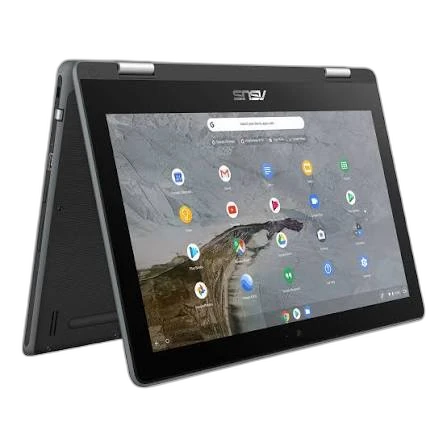
Reference model ASUS Chromebook Flip

Chromebook Flip

ASUS

Not for sale

View model
Reference model HP Noteb Pav

Noteb Pav

HP

Not for sale

View model

Specifications

Side-by-side specification comparison of two reference models

Specification Chromebook Flip Noteb Pav
Price Not for sale Not for sale
General
Brand ASUS HP
Product Family Chromebook Noteb Pav
Model Chromebook Flip Noteb Pav
Launch Year ⁦2016 year⁩ ⁦2017 year⁩
Form Factor ⁦2-in-1 Convertible⁩ Clamshell
Laptop Category ⁦2-in-1⁩ Mainstream
Operating System ChromeOS ⁦Windows 10⁩
Operating System Architecture ⁦64-bit⁩
Processor
Processor Manufacturer Intel Intel
Processor Family ⁦Intel Core m3⁩ ⁦Intel Core i7⁩
Processor Model ⁦Intel Core M M3-6Y30 0.9GHz⁩ ⁦Intel Core i7-7500U⁩
Processor Generation ⁦6th Gen⁩ ⁦7th Gen (Kaby Lake)⁩
CPU Architecture ⁦x86-64⁩ Kaby Lake
CPU Process Node ⁦14 nm⁩ ⁦14 nm⁩
CPU Cores ⁦2 cores⁩ ⁦2 cores⁩
Efficiency Cores ⁦0 cores⁩ ⁦0 cores⁩
CPU Threads ⁦4 threads⁩ ⁦4 threads⁩
CPU Base Clock ⁦0.9 GHz⁩ ⁦2.7 GHz⁩
CPU Max Boost Clock ⁦2.2 GHz⁩ ⁦3.5 GHz⁩
L2 Cache ⁦0.5 MB⁩
L3 Cache ⁦4 MB⁩ ⁦4 MB⁩
Processor Base Power ⁦4.5 W⁩ ⁦15 W⁩
Maximum Processor Power ⁦25 W⁩
CPU Manageability Technology Intel Standard Manageability; Intel vPro not supported
Graphics
Graphics Type Integrated Discrete
GPU Manufacturer Intel NVIDIA
GPU Model ⁦Intel HD Graphics 515⁩ ⁦NVIDIA GeForce 940MX⁩
GPU Architecture Maxwell
VRAM Capacity ⁦0 GB⁩ ⁦2 GB⁩
VRAM Type Shared system memory ⁦GDDR5⁩
GPU TGP ⁦23 W⁩
GPU Boost Clock ⁦1242 MHz⁩
Maximum External Displays ⁦3 displays⁩
Maximum External Resolution ⁦3840 x 2160 @ 60 Hz⁩
Memory
Installed Memory ⁦4 GB⁩ ⁦8 GB⁩
Storage
Primary Storage Type Flash Storage HDD
Storage Capacity ⁦64 GB⁩ ⁦1000 GB⁩
Installed Storage Drives ⁦1 drives⁩ ⁦1 drives⁩
Display
Display Size ⁦12.5 inch⁩ ⁦15.6 inch⁩
Display Resolution ⁦1920 x 1080⁩ ⁦1920 x 1080⁩
Resolution Class FHD FHD
Display Technology LED-backlit LCD
Panel Type IPS
Touchscreen Yes
Aspect Ratio 16:9 16:9
Ports & Expansion
USB4 Port Count ⁦0 ports⁩ ⁦0 ports⁩
Dimensions & Build
Weight ⁦1.2 kg⁩ ⁦1.91 kg⁩
Certifications & Sustainability
RoHS Compliance Yes

Summary: Which Product Should You Choose?

Choose Chromebook Flip if you need:

  • Processor Model at ⁦Intel Core M M3-6Y30 0.9GHz⁩ (vs ⁦Intel Core i7-7500U⁩)
  • GPU Model at ⁦Intel HD Graphics 515⁩ (vs ⁦NVIDIA GeForce 940MX⁩)
  • Installed Memory at ⁦4 GB⁩ (vs ⁦8 GB⁩)
  • Storage Capacity at ⁦64 GB⁩ (vs ⁦1000 GB⁩)

Choose Noteb Pav if you need:

  • Processor Model at ⁦Intel Core i7-7500U⁩ (vs ⁦Intel Core M M3-6Y30 0.9GHz⁩)
  • GPU Model at ⁦NVIDIA GeForce 940MX⁩ (vs ⁦Intel HD Graphics 515⁩)
  • Installed Memory at ⁦8 GB⁩ (vs ⁦4 GB⁩)
  • Storage Capacity at ⁦1000 GB⁩ (vs ⁦64 GB⁩)

Overall, choosing between Chromebook Flip and Noteb Pav depends on your use case and which specs matter most. They share Display Resolution (⁦1920 x 1080⁩) and Processor Manufacturer (Intel). They differ mainly on Processor Model. Review the differences above, choose by your priorities, and confirm availability before buying.

What is the difference between Chromebook Flip and Noteb Pav?

Chromebook Flip and Noteb Pav share specifications such as Display Resolution (⁦1920 x 1080⁩), Processor Manufacturer (Intel), CPU Process Node (⁦14 nm⁩), CPU Cores (⁦2 cores⁩).

The main differences: Processor Model (Chromebook Flip: ⁦Intel Core M M3-6Y30 0.9GHz⁩, Noteb Pav: ⁦Intel Core i7-7500U⁩); GPU Model (Chromebook Flip: ⁦Intel HD Graphics 515⁩, Noteb Pav: ⁦NVIDIA GeForce 940MX⁩); Installed Memory (Chromebook Flip: ⁦4 GB⁩, Noteb Pav: ⁦8 GB⁩); Storage Capacity (Chromebook Flip: ⁦64 GB⁩, Noteb Pav: ⁦1000 GB⁩).

Chromebook Flip may suit users who need its differing values, while Noteb Pav benefits those who need its paired strengths. Review the specs table above before deciding.